
Home › AI Advantage
AI Advantage
Your staff are already using AI. The question is whether it is helping them or quietly exposing your business.
From managed services to managed intelligence
A managed service provider keeps your systems running — the servers, the network, the laptops, the Microsoft 365 tenant. That is the job we have done for Southern California businesses for over fifteen years, and it does not go away.
A managed intelligence provider takes on the layer above it: choosing which AI tools belong in your business, securing the data they can reach, writing the policy around them, and then proving they are actually saving people time.
The industry started using that second term in 2026. We think it describes work we were already doing — so we will use it, but only where we can show you what it means in practice.
What that looks like day to day
- Deciding which AI tools are worth paying for — and which are not
- Making sure they can only reach data they should
- A written policy your staff will actually follow
- Training people to use the tools properly
- Measuring whether it saved anyone any time
If a provider uses the label without doing these, it is a badge, not a service.
Microsoft 365 Copilot readiness assessment
Copilot can see whatever the person using it can see. In most businesses that turns out to be far more than anyone intended — old SharePoint sites shared with "everyone," HR folders inherited from a migration, files nobody has audited in years.
We assess your tenant before you switch it on, so the first thing Copilot surfaces isn't a salary spreadsheet.
The assessment is read-only. We use least-privilege access, change nothing, and remove our access the moment collection finishes.
What we look at
- Microsoft 365 licensing and what it actually unlocks
- SharePoint and OneDrive sharing and permissions
- Sensitivity labels and data-loss prevention
- Identity, access and admin roles
- Adoption readiness and staff enablement
The rest of the AI work
Safe AI rollout
Policy, guardrails and training so staff can use AI without putting company data somewhere it shouldn't be.
Shadow AI audit
Find out what is already being pasted into public AI tools, and put something sensible in place around it.
Workflow automation
The repetitive work that eats hours — quoting, reporting, data entry — automated where it genuinely pays back.
Two workflows we actually built
Automation is usually the part of AI work that pays back fastest, because it replaces something a person is doing by hand every single week. Both of these run on n8n against live production databases. These are the real graphs, with the client-identifying details taken out.
Commission runs, every fortnight, with nobody in the middle
Sales commissions were being assembled by hand from sales and payment records. Slow, and easy to pay the same commission twice or miss a partial payment entirely. Now it runs itself, at midnight, and a person only looks at the exceptions.

The automation was the easy half. The work went into the things that go wrong quietly: never paying the same commission twice, handling partial payments correctly, making exceptions visible instead of silently absorbing them, reconciling before anything is finalised, and reporting that never rewrites history. Then testing the failure paths on purpose.
The AI that was only reading the first two sentences
A sales organisation had an AI pipeline scoring tens of thousands of customer emails for sentiment, urgency and buying signals, feeding dashboards the team used every day. Three chained workflows, each picking up work from a SQL queue so nothing is processed twice. The shape was sound.
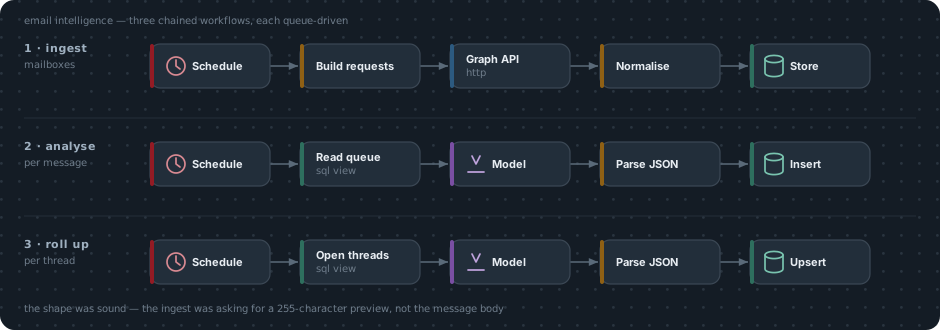
We reviewed it against the live data. Not one message in the database was longer
than 255 characters. The ingest was requesting Microsoft Graph’s
bodyPreview field, which truncates at exactly that, rather than the message
body.
So every sentiment score, every escalation risk and every sales-opportunity verdict in the system had been formed from about two sentences of a greeting. A complaint in the third paragraph did not exist as far as the AI was concerned. Nothing downstream could compensate, and no amount of prompt tuning would have found it — it took reading the data.
That is most of what AI work honestly is: not the model, the plumbing around it.
Fixed scope, no surprises
Scope
A short conversation about your tenant, your goals and what you are hoping AI will do for the business.
Collect
Read-only collection against your Microsoft 365 tenant. Nothing is changed.
Report
A written report with findings ranked by severity, and a plain-language explanation of each.
Remediate
We fix what you want fixed. Or you take the report to whoever you like — it's yours.
Not sure whether you're ready?
That is exactly what the consultation is for. We will talk through what you have and tell you honestly whether an assessment is worth your money yet.